Your boat, with the numbers on her
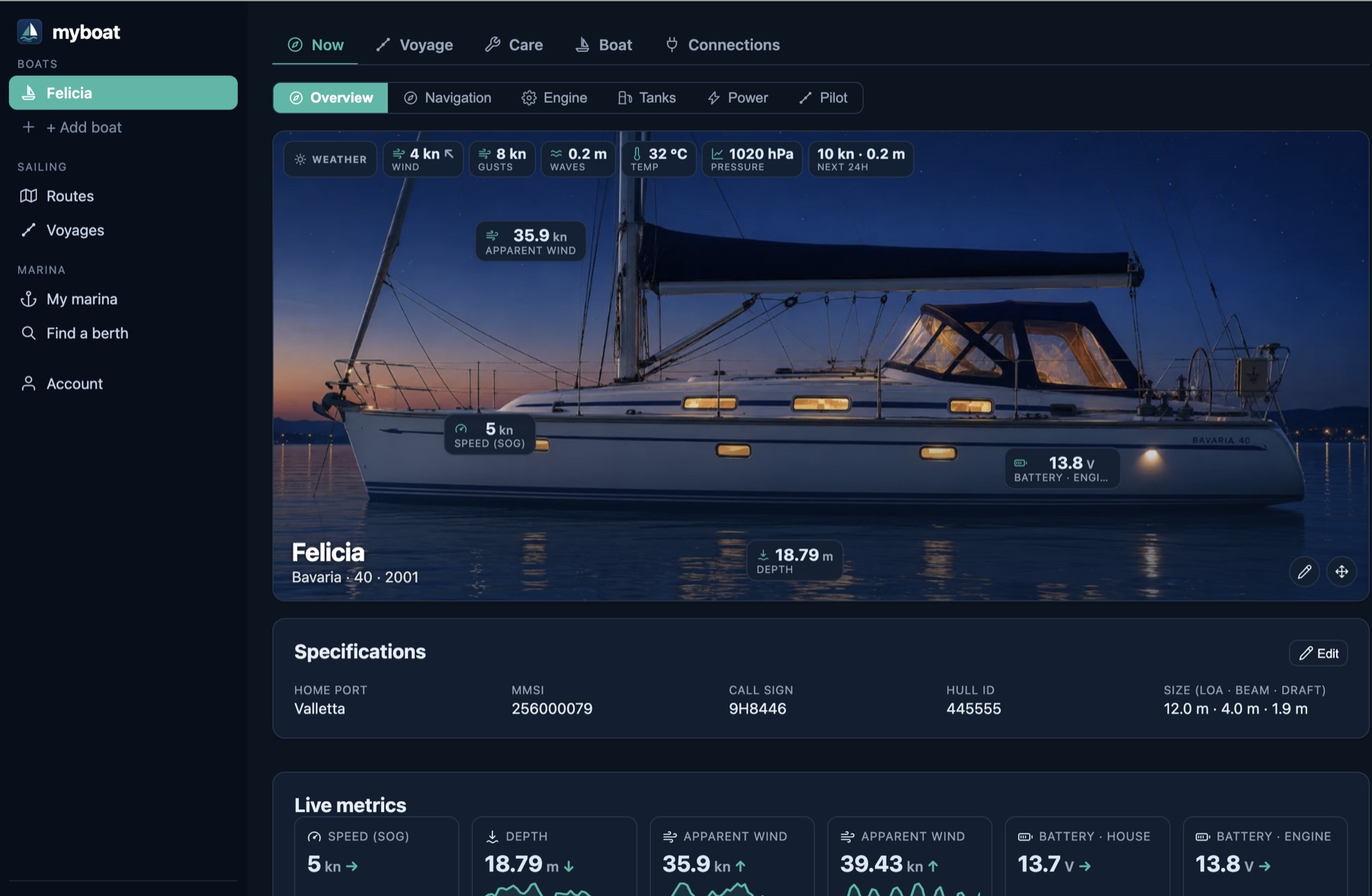
Live readings pinned onto your own photo of her, and the full instrument panels beneath.
A small computer running SignalK on board is all it takes. myboat turns it into live dashboards, alarms, weather and history on your phone — plus routes to your autopilot and a digital boat identity that follows the boat for life. Open formats in, open formats out.
Live readings pinned onto your own photo of her, and the full instrument panels beneath.
Built by sailors, on SignalK and open formats. Below is what actually ships today — not a roadmap.
Your own photo of her, with the readings you care about pinned where they belong — wind at the masthead, depth under the keel. Drag them anywhere.
A gauge per tank, fuel and fresh and waste, each in the unit you chose, and amber when the fresh water is low or the holding tank is not.
Shore, solar and alternator on one side, the battery in the middle, AC and DC loads on the other — the flow drawn out, the way a Victron screen does it.
A tacho arc per engine with coolant, oil pressure and load beneath it. A missing reading draws nothing at all, because a gauge resting at zero says the oil pressure is zero.
A compass rose with true and apparent wind, heading, speed and depth — ported from a real helm display, colours and all.
Engaged or standby, the mode, and the locked heading against the bow. Status only, deliberately: a steering command over a minute-long link is not something we will ship.
Pick from what your boat actually publishes — each path shown with its live value — and set a threshold, a geofence or an anchor watch.
Phone push, Telegram, Discord, email or your own webhook. The delivery log is on the same screen, because a channel that has stopped working still looks configured.
A deadband on the clear side so a reading resting on the threshold cannot ping you all night, plus acknowledge and a snooze that always has an end.
Drop a circle round where you set the hook. Drift out of it and you hear about it.
Left in the marina for the winter? Ask them to watch her: leaving the berth, shore power lost or the battery falling alerts you and the office both.
A firing alarm sits above every tab, not just the alarm one. A warning you only see after navigating to the right screen is not a warning.
Click a course on the chart, name the waypoints, import or export GPX. Nothing proprietary about any of it.
One button and the route is in SignalK aboard, optionally set as the active course for the autopilot chain to follow.
A cruise as stops and nights rather than dates, so moving departure by a week is one edit and not a rewrite. Crew, meals, checks and berths all hang off it.
It knows who is aboard on which day, so the shopping is counted in person-days per resupply stop instead of typed in — and water and fuel are read from your own tank senders.
Trips are worked out from where she has been — distance, duration, engine hours — and you add the notes, the weather and the crew.
Play back any passage, and read every recorded value at that moment. It is your data; export it whenever you like.
Every unit aboard with its make, model, serial and install date, and which spares you hold for it.
Manuals, wiring, registration, insurance, survey and receipts — grouped, searchable, and openable in the browser rather than downloaded first.
Put a date on the insurance certificate and navdeck tells you before it lapses, not after. A filing cabinet cannot do that.
Draw her wiring, plumbing, gas and network yourself — over a scan of the builder's plan if you have one. The drawing every owner wants and nobody has.
Tap the inverter and get the actual unit, its manual and its live reading — because a symbol can point at a real piece of equipment and a real sensor.
Every job, what it cost, who did it and at what engine hours — including the ones a navdeck yard did, written in automatically.
Which berth you hold, at what rate, until when — and whether she is actually in it right now, which the contract cannot tell you.
Talk to the harbourmaster in the app you already sign into, instead of chasing a link in an email.
Your invoices and your prepaid water and power balance, readable without asking anyone to send them.
Search real availability at navdeck marinas for your dates, pre-filled with your boat's dimensions, and pay to hold it.
The marina's own approach route on your chart, ending at your berth, and a live bearing to it on final approach. You can push it to the plotter.
Tell them the dates you are gone and let the berth be re-let. Your share comes off your next invoice — and only ever while she is genuinely not in it.
Share with a marina, a manager or family — and choose whether they see just position, the systems too, or the history as well.
Access is a grant you gave and can take back, and the limit is enforced on the server rather than hidden in the interface.
An Android and iOS app for the glanceable half — boats, live status, position and push alarms.
Equipment, documents, schematics, service history — the buyer gets all of it and you are locked out. That is the point of the whole thing.
SignalK aboard, GPX for routes, CSV for the rest. Export anything, any time, on any plan.
No card to start, and downgrading never deletes anything. The boat profile transfers on the free plan too.
Free plan, no card. A Raspberry Pi and one plugin is all you need to get started.